
Mixer View.
Every track with its name and colour from the Set: fader, pan, live VU meter, mute, solo and arm.
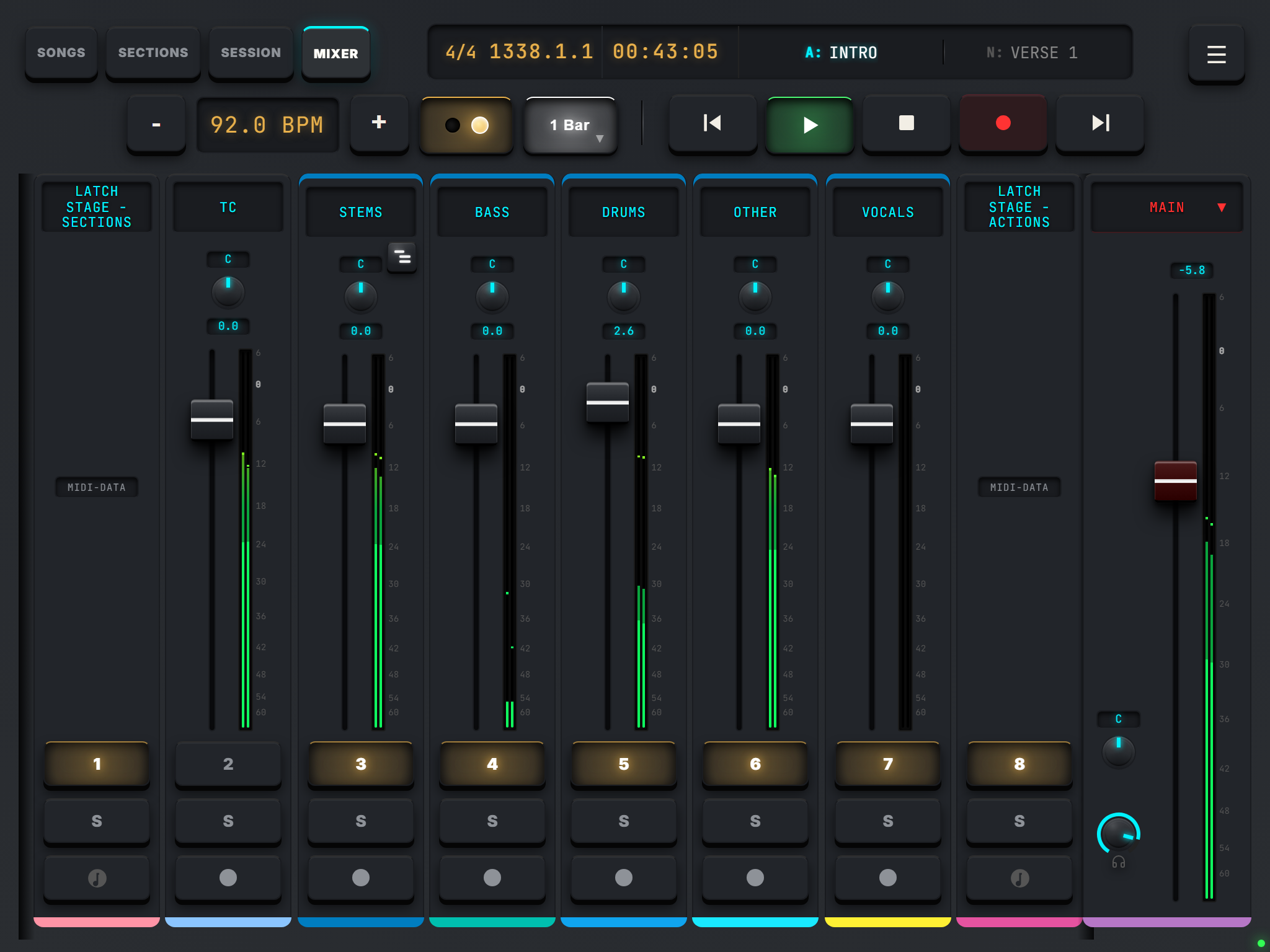
A mixing console for the Live Set, on the tablet.
Each track in Live is a channel strip with its name and colour from the Set: volume fader, pan knob, live VU meter, mute, solo and record arm.
The channels always fit the screen, with no sideways scrolling, and the faders and knobs are sized for fingers.
Key features#
- Channel strips. Fader, pan knob, VU meter coloured by level, solo and record arm.
- Two kinds of mute. A track you muted looks different from a track silenced because another one is soloed.
- Groups fold. Collapse a group to save space. When it is open, its child channels keep the parent’s colour.
- Sends. One tap switches the whole console from Main Master to a return track, to mix monitors and effects sends from the stage.
- Where the song is.
A:shows the current locator andN:the next one, skipping sections muted in Sections View.
- Transport by count. Previous and next buttons step between locators, so you can move without looking while a hand stays on the faders.
On stage role#
Adjust levels and monitor mixes from the stage, without walking to the host computer.
Editions & requirements#
- Editions: Suite
- Requirements: Ableton Live 11 or 12 running on macOS or Windows; any tablet, phone, or laptop browser connected over the local network.