
Songs.
The main screen, and the only one you need in Solo. Every song is a large button with its colour, number and title.
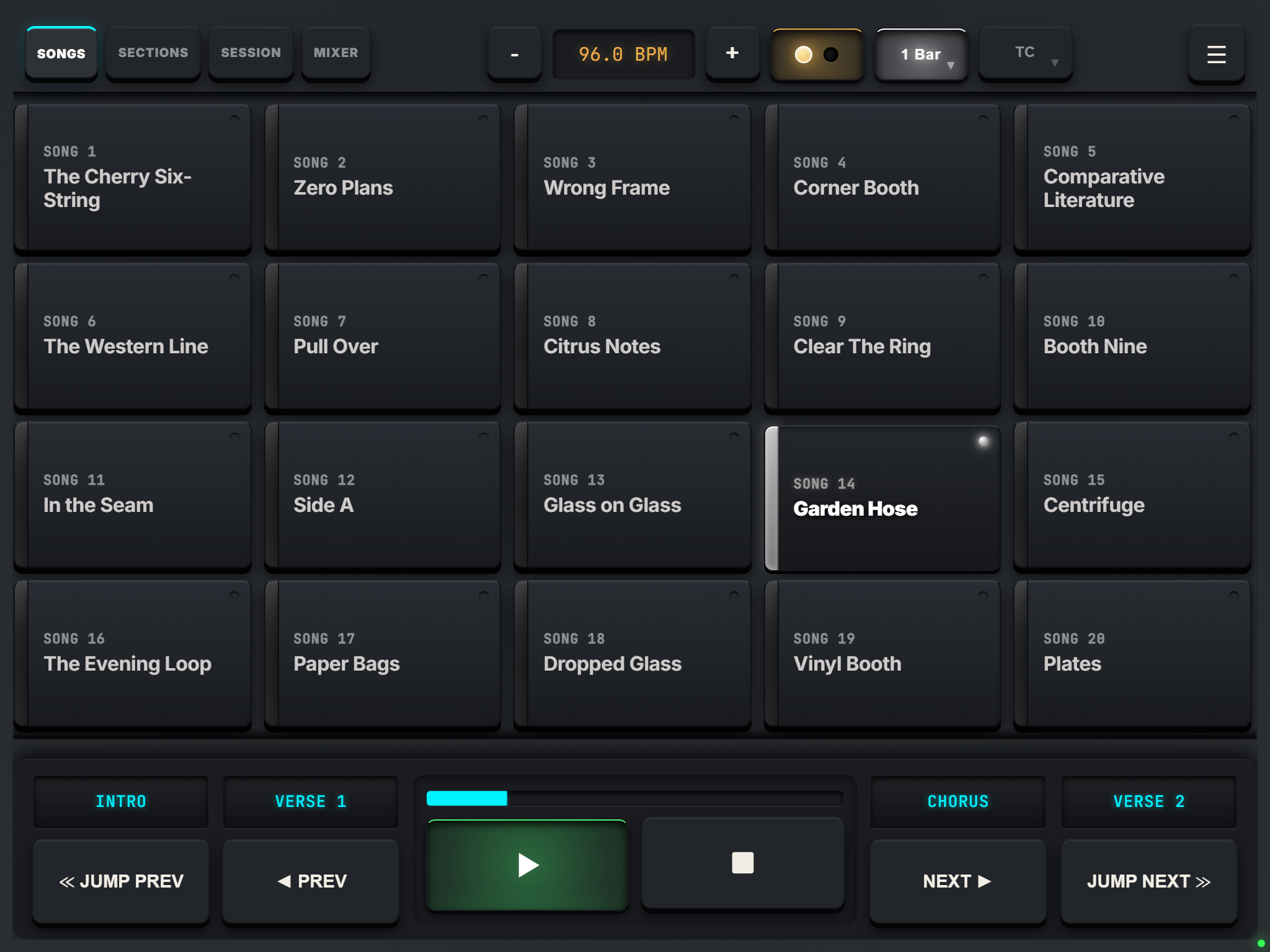
The main screen, and the only view in Solo. This is where the show is run.
Each song is a large button carrying its colour, its number in the Set, and its title.
The grid follows the show and scrolls to the song that is playing.
Key features#
- Song state. A button pulses while it waits for the quantisation point, lights solid while it plays, and is dimmed and struck through once played.
- Launch on the grid. In Timeline mode a tap jumps to the song’s first locator; in Session mode it launches the song’s first section, or fires the scene when the Set has no
#scenes. Both wait for Live’s quantisation.
- Transport bar. Buttons jump between sections, and small displays name the locator you will land on before you press.
- False start. PREV goes straight back to the start of the current section.
- TC button. A tap mutes or unmutes the track you chose; press and hold to pick another one.
- Show timer. Starts with the first song and shows the same time on every connected screen.
On stage role#
The musical director’s screen: one tap per song, and the sections of the playing song one tap away.
Editions & requirements#
- Editions: Solo · Standard · Suite
- Requirements: Ableton Live 11 or 12 running on macOS or Windows; any tablet, phone, or laptop browser connected over the local network.