
Actions TrackStandardSuite
An Actions track is an ordinary Live track whose clip names are read as commands. It is how the Set drives itself: tempo changes, jumps, loops, metronome, time signature, all written where they happen, on the timeline. The clips are never heard; only their names are read.
On Solo the Actions track is disabled and command clips are silently ignored: nothing appears
in Live’s status bar. The only trace is one line in the Latch Stage log when the edition is
applied: [ACTIONS] EngineMacros DISABLED (Solo Edition).
9.1 Creating and naming the track#
Name the track so Latch Stage recognises it. The recommended name is:
Latch Stage - ActionsOnly three names are recognised, and this is stricter than it used to be:
| Name | Read in |
|---|---|
Latch Stage - Actions | Both — Arrangement and Session |
Latch Stage - Actions (Arrangement) | The Arrangement only |
Latch Stage - Actions (Session) | Session View only |
The match ignores capitals, tolerates a leading track number the way Live writes it
(19 - Latch Stage - Actions), accepts square brackets in place of the parentheses
([Session]), and forgives the common typing slip Lacth for Latch. Nothing else
counts.
If you built a Set before this rule, check the track name. Earlier versions accepted almost anything containing the word Action:
Actions,LS - Actions,ACTIONS_MIDIand so on. Those names are no longer recognised, and a track that is not recognised is simply not read: the clips sit there and no command ever fires, with nothing on screen to say why. To fix it, rename the track to one of the three above.The narrowing was deliberate. The old rule matched generic tracks that merely had “action” in the name and read them as command tracks, which is worse than not reading them at all.
More than one Actions track. A show often wants different commands in the Arrangement
and in Session View. Use the suffixed names from the table above: a track ending in
(Arrangement) is read only in the Arrangement, one ending in (Session) only in Session
View, and Latch Stage - Actions in both. Any number of Actions tracks can coexist, and all
of them are read.
9.2 The command language#
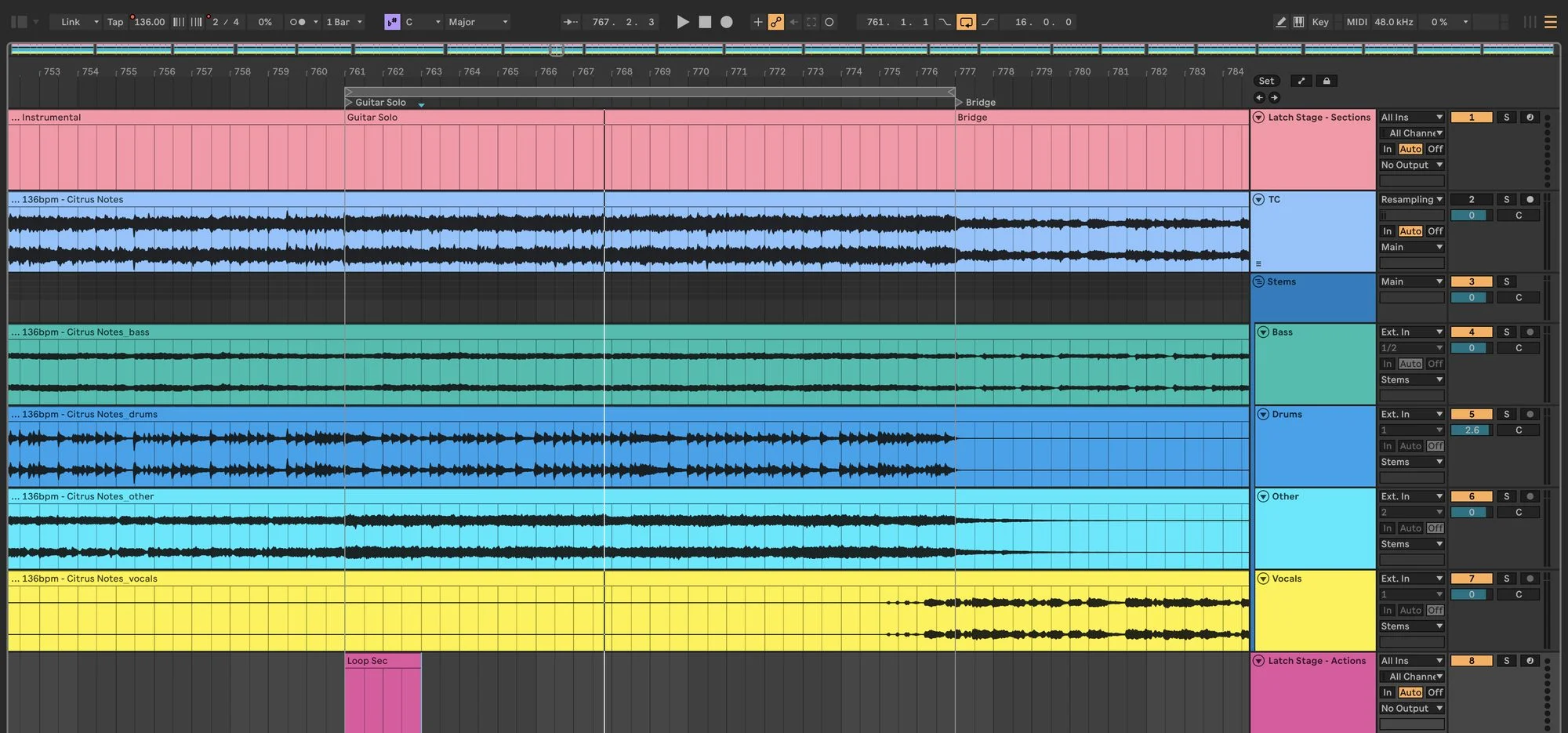
LOOP SEC setting an automatic section loop.Write the command in the clip name. When the playhead reaches the clip, it runs.
| Command | What it does | Examples |
|---|---|---|
BPM 128 | Set the tempo | BPM 128 · TEMPO: 92 · 140 BPM |
RAMP 140 | Ramp the tempo, in a straight line, to a value across the clip’s length. It stops where it got to if the transport stops, the playhead moves back before the ramp’s start (a loop wrapping, say) or another BPM runs | RAMP BPM 140 · RAMP TO 96 |
LOC "Chorus" | Jump to a locator by name. Capitals, accents, spaces and punctuation are ignored, so LOC "pre chorus" finds Pre-Chorus | LOC "Bridge" |
LOC @R12 | Jump to a locator by its timeline position, counted from 0 (@R12 is the 13th). The quoted name is only a label; it is used only when the index is past the last locator | LOC @R12 "Chorus" |
LOC > · LOC < | Jump to the next · current locator | |
LOC +2 | Jump forward two locators | LOC -1 |
LOOP 4 | Loop four bars, snapped to the grid | LOOP 8B · LOOP 16 BEATS · LOOP OFF |
LOOP SEC | Loop the section the clip is in, whole | LOOP SECTION |
METRO ON | Metronome on or off | CLICK OFF · METRONOME ON |
SIG 6 8 | Change the time signature | SIG 3/4 |
SCENE "Outro" | Fire a Session scene by its whole name, in double quotes (capitals ignored), or by its number in Live, counted from 1. A name without quotes does nothing | SCENE 4 |
STOP | Stop the transport and return to the start | |
NEXT SONG | Advance to the next unmuted song in the setlist | NEXT · NEXT TRACK |
WAIT 2 | Delay what follows by two bars | WAIT 4 BEATS · WAITS 1B |
Check the spelling of every
LOCtarget. When no locator matches the name and the name holds digits, the digits are read as a relative jump: a mistypedLOC "Verse 2"moves two locators forward. Without digits, a name that is not found does nothing.
Units: a bare number, or B / BAR / BARS, means bars. BEAT, BEATS, BT or P
means beats. For WAIT, a bar is counted as the top number of the Set’s time signature, in
beats: right in 4/4 or 3/4, but in 6/8 WAIT 1 lasts six beats, or two 6/8 bars. In a meter
over 8, write WAIT in beats.
Two ways to write a loop. Give it a length, or name the section.
| Written | Length of the loop |
|---|---|
LOOP 4 | Four bars |
LOOP 8B · LOOP 8 BARS | Eight bars |
LOOP 16 BEATS · LOOP 16BT · LOOP 16P | Sixteen beats |
LOOP SEC · LOOP SECTION | The whole section the clip is in — from its locator to the next |
LOOP · LOOP ON · LOOP IN · LOOP TRUE | No length given — starts a loop at the playhead, keeping the length already set |
LOOP SEC is the form to reach for when the section’s own length is what you want. You
do not count bars, it keeps working when the section is later made longer or shorter, and,
unlike a numeric loop, the clip may sit anywhere inside the section. Put it on the
downbeat, four bars in, or just before the end: when the playhead reaches the clip, the loop
closes around the section that contains it.
LOOP SEC always starts on the section’s own locator and runs to the next one. In the
last section of a song, where no locator follows, it runs to the end of the Set. The shortest
section loop is one bar, and the command is ignored in a Set that has no locators at all.
Where a numeric loop starts. A LOOP 4 starts at a locator if one is within half a beat of
the clip. Away from a locator it is snapped to the grid, never to the clip’s raw position:
it starts on the nearest bar line, counted from the section’s locator, whether its length is
written in bars or in beats. A clip dragged slightly off the grid still produces a musical
loop.
A LOOP with no length starts one anyway. LOOP, LOOP ON, LOOP IN and
LOOP TRUE all mean the same thing: begin looping on the downbeat of the bar nearest the clip, not at the
clip’s exact position: a clip at 10.2 opens the loop at 10.1, one at 10.4 opens it at 11.1
(or on a locator, if one is within half a beat), keeping whatever loop length the Set already
has. Nothing is measured and nothing is guessed: the
length is the one already in Live’s loop brace. Should that length be unusable (zero, or
longer than sixty-four bars), the command falls back to eight bars rather than refusing.
Use it when the length was set earlier in the show and you only want to re-arm the loop somewhere new.
ON before a length changes nothing. LOOP ON 8 is the same as LOOP 8; the ON only
makes the clip name read better.
A bar is read from the Set’s time signature, so LOOP 2 in 6/8 is two 6/8 bars. The
shortest loop the engine will set is one beat.
One length to avoid writing: a value beginning with zero, such as LOOP 0.5, is read as an
off command, because 0 is itself one of the off forms. For half a bar, write it in beats:
LOOP 2 BEATS in 4/4.
LOOP OFF (also written LOOP 0 or LOOP FALSE) switches the loop off and clears the
loop mark in Sections View. Launching a song or firing any block clears it as well.
Live will occasionally refuse a loop change made while the transport is moving, so Latch Stage re-applies it over the next few seconds. It keeps checking for about 1.8 seconds and re-asserts the loop, with its start and length, if Live dropped it. When that happens, the loop visibly snaps into place a moment after the clip.
A live loop is announced on stage. While the playhead is inside Live’s loop, a pulsing LOOP badge sits next to the timer on the Teleprompter, the Stage Setlist and the Tech Guide, so nobody has to guess whether the section is going round again. Live’s loop switch being on is not enough: a loop brace set somewhere else in the arrangement leaves the badge dark until the playhead actually enters it. The badge answers the question the band is asking: is this bit going to repeat?
Command clips at the end of a loop do not fire early. While a loop is running, any Actions clip that sits at or past the loop’s end point is held back: macros, MIDI and OSC alike. Without this, the clip that ends the section would fire on the first pass and every pass after it, changing the patch or the tempo while the band is still going round. The clips inside the loop keep working normally, and the held clip fires as usual once the loop is released.
9.3 Combining commands in one clip#
Three separators, each with a different job:
| Separator | Meaning |
|---|---|
; or | | Run together, at the same instant |
>> | Run in sequence, in the order written |
WAIT n | Insert a musical pause before everything that follows |
Running together. Everything in the group fires at once:
BPM 128 ; METRO ON ; LOOP 4Commands joined only by ; or | run in the order you type them. When a jump travels with a
loop, write the LOC first: LOC "Chorus" ; LOOP 4 loops at the Chorus, while
LOOP 4 ; LOC "Chorus" sets the loop where the clip is and then jumps away. Only a ; group
used as one step of a >> chain is re-ordered: LOC first, then STOP, SIG, BPM,
METRO, LOOP, and everything else last, a WAIT included, so WAIT 2 ; BPM 140 inside
one step fires the BPM at once.
Running in sequence. >> fixes the reading order. On its own it does not delay
anything. A >> B still fires both at the same instant. What creates a gap is WAIT:
METRO ON >> WAIT 4 >> METRO OFF >> WAIT 2B >> LOC "Chorus"Read that as: metronome on immediately; four bars later it goes off; two bars after
that, the jump. WAIT accumulates down the chain, so each one is counted from the previous. After a LOC
that runs at once, the count restarts from the locator it jumped to, and the WAITs that follow
only start once the playhead has arrived there.
The pending queue. Everything not delayed runs at once; everything behind a WAIT goes
into a queue that is consumed as the playhead advances. Four rules govern that queue, and
they are what catch people out:
- It only advances while the transport is running. A
WAITnever elapses with playback stopped. - Stop clears it. Anything still pending is discarded, along with any tempo ramp.
- A jump discards stale commands. After the playhead jumps, queued commands that were created far from the new position are thrown away instead of firing in the wrong place.
- A Session Actions clip clears it. Firing one cancels a sequence still in flight (see the next section).
9.4 Arrangement and Session: what changes#
The same clip name behaves differently depending on where the clip sits, because what triggers it is different.
| Arrangement (Timeline) | Session View | |
|---|---|---|
| What triggers it | The playhead reaching the clip | The slot (or its scene) being fired — at the moment of the fire, before launch quantization starts the clip, with the transport running or stopped |
Time zero for WAIT | The clip’s start position on the timeline | The moment of the trigger |
Length used by RAMP (LOOP never uses it) | The clip’s length on the timeline | The clip’s length |
| Firing again | Passing over the clip again fires it again; a playhead jump re-arms every clip | Every time the slot is fired |
| The pending queue | Kept | Cleared by the incoming command |
Three consequences worth knowing:
- In the Arrangement, timing is anchored to the clip, not to the moment it was noticed.
WAIT 4counts four bars from where the clip starts, so the same clip always behaves the same way, whatever route led the playhead to it. Clips are also read about 25–30 ms early so the command lands on the beat rather than after it. A clip whose name containsNEXTanywhere, orSTOPwith Auto Next on, is read a full bar ahead (as many beats as the top number of the time signature), and that applies to every command in it: put commands that must land on the downbeat in a separate clip. - A
BPMin an Arrangement clip name takes a fast path, applied the instant the clip is reached, before the rest of the name is even parsed. A tempo change written this way lands exactly on the clip. The fast path reads the whole name, so aBPMwritten behind aWAITalso lands on the clip, not after the wait. To change the tempo later, put thatBPMin its own clip, where the change should happen. (In Session, aBPMbehind aWAITdoes wait.) - In Session, firing a clip while stopped runs it immediately. Tempo, metronome and time signature are therefore already set when Play is pressed. That is how a scene arrives at the right tempo instead of correcting itself after the first bar.
9.5 How Actions interact with the rest of the system#
With the Virtual Route [Standard · Suite]. A LOC command is checked against the
active route before it runs. When the command belongs to a scene that has just been
launched, its target is also realigned to that song’s first playable block, so the scene
enters the song where the route says it should. If the target section is muted, the jump is redirected to the
next playable section; if there is none, playback stops rather than playing something that
was deliberately cut. A Set full of LOC commands therefore keeps working after the
operator reshapes a song in Sections View, with no clip edited.
With TAP END [Standard · Suite]. While a TAP END transition is armed or running, and for
a few seconds after it, LOC, STOP, SCENE, NEXT SONG and any LOOP that switches a loop
on are ignored so that the section on air can finish cleanly. Each ignored command is logged.
LOOP OFF still runs. Commands of those kinds already waiting behind a WAIT are discarded,
LOOP OFF included. See §11.5.
With Auto Next [Standard · Suite]. With Auto Next on, a STOP command becomes an
advance to the next song. One switch turns the same Set from a show that stops between
songs into a continuous show.
With Live’s Clip Activator. A clip switched off with its Clip Activator does not fire. This holds on every track Latch Stage reads for commands: the Actions tracks, the Midi Scripts tracks (§16.7) and the OSC Scripts tracks (§17.3), in the Arrangement and in Session View alike. It is the quickest way to take one command out of tonight’s show without deleting it: switch the clip off, and switch it back on when it is wanted. That works even during playback, where the clip is picked up again.