
TP BuilderSuite
The lyric editor (/tp-builder). It writes the same .txt files described in §13.2, but
with the locators of the Live Set in view, so the sections line up.
18.1 The screen#
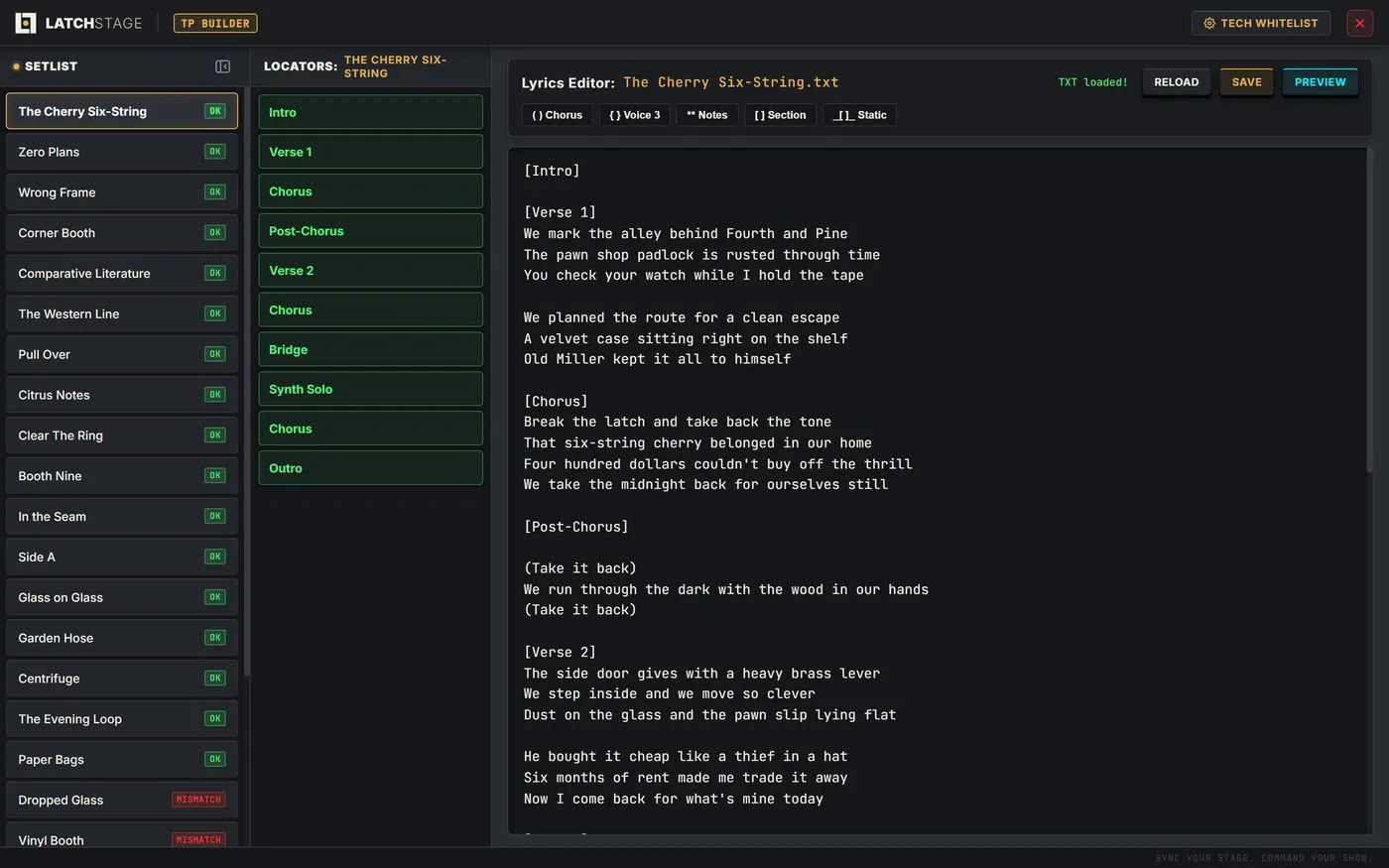
Left. The songs of the show, each with a status:
| Status | Meaning |
|---|---|
| OK | A lyric file exists and its sections match the locators |
| NO TXT | No lyric file was found for this song |
| MISMATCH | A file exists but its section tags do not line up with the locators |
Selecting a song shows its locators, so the operator sees exactly which section tags the file should contain.
Centre. The text editor.
18.2 Writing#
Five buttons insert the markers at the cursor, so the format need not be memorised:
( ) Chorus: backing vocal line{ } Voice 3: third voice line** Notes: instruction or technical note[ ] Section: a normal section tag_[ ]_ Static: a static section. It does not scroll, its text is auto-fitted to the screen (§13.2) and it holds the setpoint until it releases (§13.4)
RELOAD re-reads the file from disk. SAVE asks for a file name (.txt is added if
missing) and writes the file into the Lyrics Folder. If no valid Lyrics Folder is set,
nothing is written, yet the screen still shows “Saved successfully!” Set the folder first.
PREVIEW shows the result as the Teleprompter will render it, in the Teleprompter’s own
colours and sizes.
Saving reloads the lyrics on the Teleprompter automatically, but only when the song being edited is the one currently on screen, so an edit during a show cannot disturb the song being played.
18.3 The technical locator whitelist#
Some locators mark technical events rather than sung sections: Contagem, Count, TC,
SMPTE, BPM, Tempo, Click, Metro, Stop, Next Song, Next Track, Next. These
are not expected to have lyrics, and a song should not be reported MISMATCH because of
them.
The whitelist names them. It ships with the common list, is edited from TECH WHITELIST in the toolbar and saved with SAVE & APPLY, and a locator is added or removed by tapping its TECH / +TECH badge in the locator list. RESET DEFAULTS restores the standard list.