
OSC EngineSuite
The OSC Engine sends OSC messages over the network, driven by the same clip names. It is how Latch Stage speaks to visuals and lighting software (Resolume, QLab, media servers, lighting desks) over Ethernet or Wi-Fi rather than MIDI cable.
It lives in the same window as the MIDI Engine: the OSC ENGINE tab at the top of Tools → MIDI/OSC. Four tabs, in order: DEVICES, SETTINGS, GLOBAL TEST and LIVE LOG.
17.1 Devices#
An OSC device is a Device Name, a Host / IP and a UDP Port, for example
Resolume Arena, 192.168.1.100, 7000. Devices import and export as one file.
17.2 Translators#
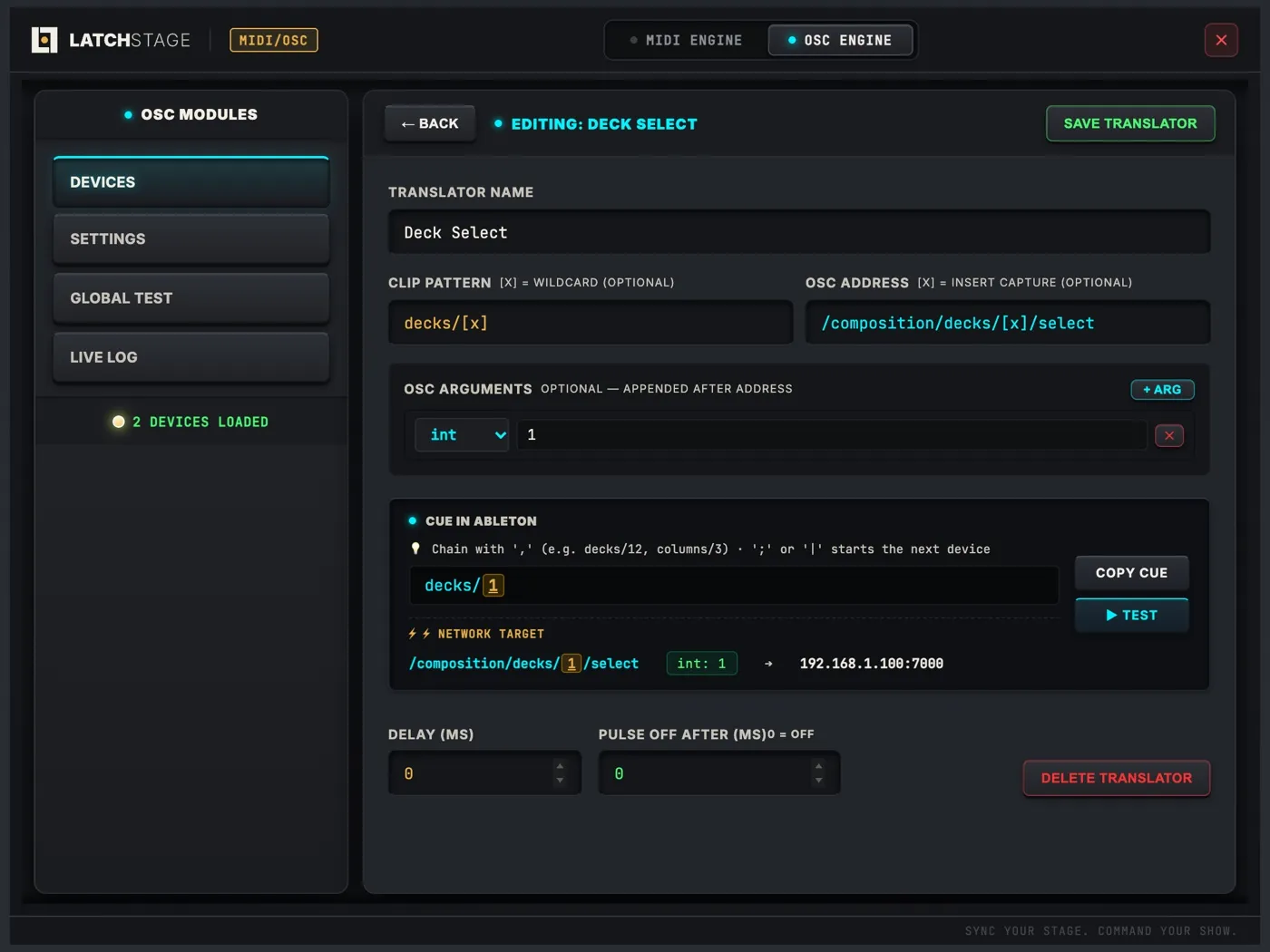
Each device holds translators, which turn a piece of clip text into an OSC message. They are listed as compact cards; EDIT opens one in its own editor, with a live preview of the message it will produce, the host and port it will reach, and a button to send it as a test.
| Field | Meaning |
|---|---|
| Translator Name | For the operator, e.g. Deck Select |
| Clip Pattern | The text to match. [x] is a wildcard that captures a value: decks/[x] matches decks/10 and captures 10. A pattern without [x] matches a fixed word |
| OSC Address | The address to send. [x] inserts the captured value: /deck/[x]/select |
| OSC Arguments | Optional values after the address, each typed int, float or string. A value of [x] inserts the capture. With none, the address is sent alone — unless the pattern has [x] and the capture is a whole number, which is then sent as one int; a transport template adds its state (§17.4) |
| Delay (ms) | Waits this long before sending. Fixed milliseconds, not beats |
| Pulse OFF after (ms) | Sends the same address a second time with its numeric arguments replaced by 0 (a single 0 if it has none), this long after the first. 0 disables it. This is how a momentary button is driven — 1, then 0 |
The pattern decks/[x] with the address /composition/decks/[x]/select turns the clip name
decks/10, columns/7 into the corresponding OSC messages.
Device and command syntax hierarchy. Like the MIDI Engine (§16.4), the OSC Engine follows a strict syntax hierarchy:
- Different devices are separated strictly by
|or;(e.g.Resolume: decks/10 ; GrandMA3: cue 10). - Multiple commands for the same device can be separated by commas
,or by spaces (e.g.decks/10, columns/7orcue 10 haze on). - A semicolon
;is strictly a device delimiter and is never used to separate multiple commands intended for the same device.
The OSC Engine has no > convention and no Pre-fire. Device sections in a clip name are
separated by | or ; only, and timing comes from each translator’s own Delay and
Pulse fields, in milliseconds. A message is sent when its clip plays. It is not sent
early to meet a launch quantisation, as MIDI can be (§16.2).
17.3 Which tracks are read — the OSC Scripts tracks#
As in the MIDI Engine, tracks are chosen by name alone:
Latch Stage - OSC Scripts
Latch Stage - OSC Scripts|Resolume Arena
The same tolerances apply: capitals, a leading track number, Lacth. A clip on any other
track is never read, and a clip whose Clip Activator is off is skipped (§9.5).
Environment qualifiers (Session or Arrangement). By default, an OSC Scripts track monitors both Session View clip slots and the Arrangement timeline. You can restrict a track to read clips from only one view by adding an environment qualifier in parentheses or square brackets:
Latch Stage - OSC Scripts (Session)or[Session]: reads clips exclusively from Session View clip slots.Latch Stage - OSC Scripts (Arrangement)or[Arrangement]: reads clips exclusively from the Arrangement timeline.
Dedicated tracks can combine the environment qualifier with |<Device>:
Latch Stage - OSC Scripts (Session)|Resolume ArenaLatch Stage - OSC Scripts (Arrangement)|Resolume Arena(The qualifier can also be placed after the device name, e.g.Latch Stage - OSC Scripts|Resolume Arena (Arrangement)).
Unified tracks and targeting by prefix. On a unified track (Latch Stage - OSC Scripts), commands can use a device prefix Tag: or DeviceName: (for example, Resolume: decks/10, columns/7 ; GrandMA3: cue 10, haze on). The engine matches the prefix against:
- Exact device name (case-insensitive)
- Device ID (case-insensitive)
- Any registered device tags (case-insensitive)
- The first word of the device name (case-insensitive, e.g.
ResolumematchesResolume Arena)
When a prefix matches a device, only that device executes the command. If a command has no prefix, it broadcasts to every active device whose translators match the pattern. A device whose Enabled box is cleared is skipped.
Dedicated tracks. On a dedicated track (|<Device>), the name after | is matched using the same unified matching rules (exact name, ID, tags, or first word). Commands without a prefix go straight to the dedicated device. If a command contains a prefix belonging to another device, it is ignored on this track to prevent cross-firing. In GLOBAL TEST, if a dedicated device specified after | is not found in the library, a warning appears in the test log: Dedicated device '…' not found in library. During live playback, clips on that track will simply not fire if the device is not found. Check the dedicated name against your device library before the show.
17.4 Transport events#
SETTINGS holds two optional templates sent whenever Live’s transport starts or stops: a
PLAY COMMAND TEMPLATE and a STOP COMMAND TEMPLATE. Leaving one empty disables it.
Both are sent on every change, and [x] in a template carries the new state:
| Template | [x] while playing | [x] when stopped |
|---|---|---|
| PLAY | 1 | 0 |
| STOP | 0 | 1 |
The Invert value box beside each template swaps its two values, for software that expects
0 to mean on. The templates are routed through the same translator system, so a matching
translator must exist. In that translator every int argument is replaced by the state (after
Invert), and a translator with no arguments gets the state as one int; fixed integer values
there are ignored.
17.5 GLOBAL TEST and LIVE LOG#
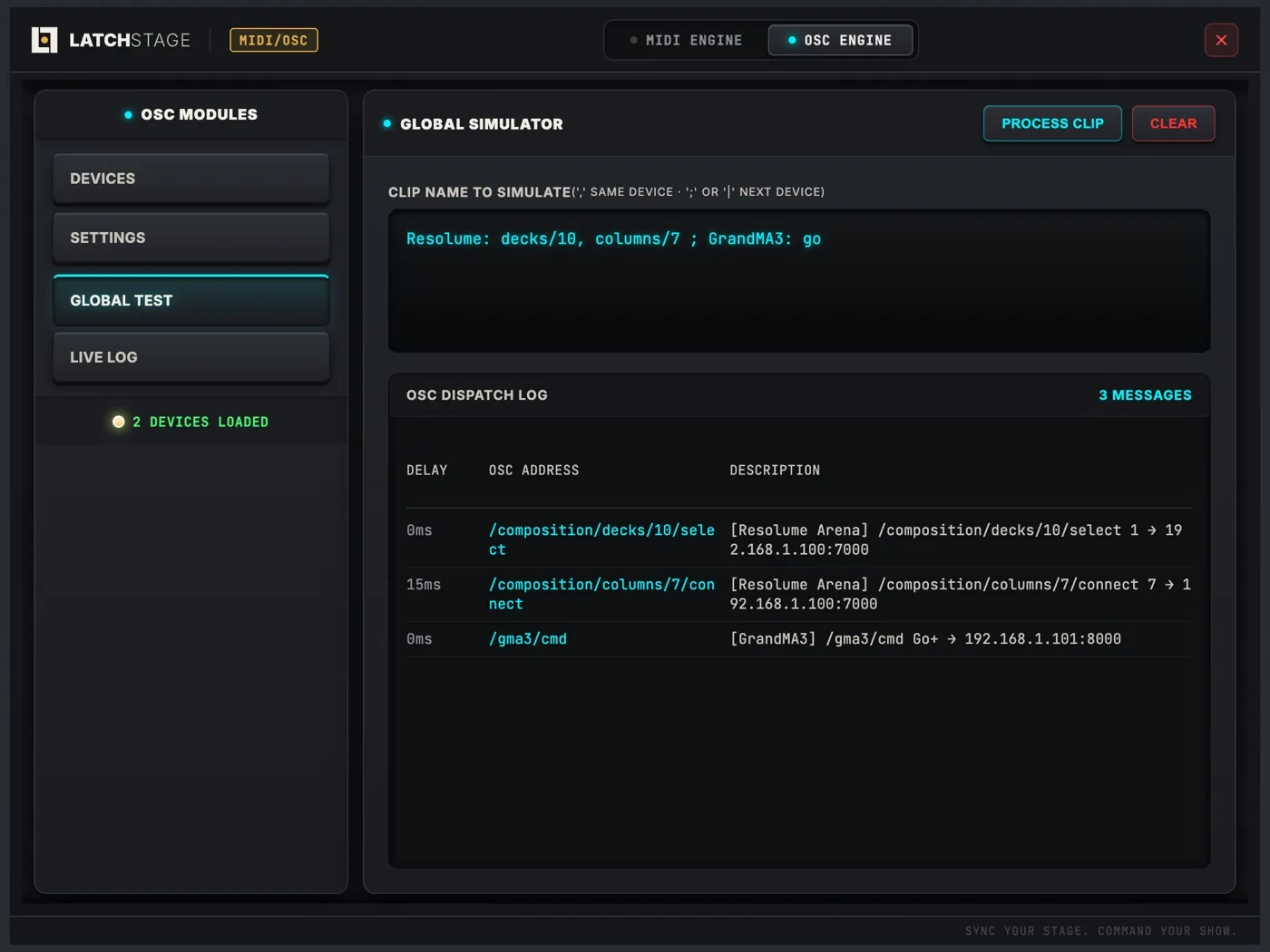
GLOBAL TEST. Type a clip name, run it, and the dispatch log lists every OSC message produced, with its address and arguments. Each one is also sent to its target: this is not a dry run. If no section matches any translator, the log says No matches found for this clip name.; a section that matches nothing while others match is left out without a message.
LIVE LOG. Shows every OSC message as it leaves, with its target host and port, whether it came from a clip, a test or a transport event. The list shows at most forty messages a second; past that it adds one line, more messages hidden (rate limit), and skips the rest of that second. This thins the display only; every message is still sent. While Pause is ticked no new lines are added; messages sent meanwhile never appear in the list.